
Operational Overview
Below shows the specific parts of Vu Pro. Read further to explore the functionality of each part!
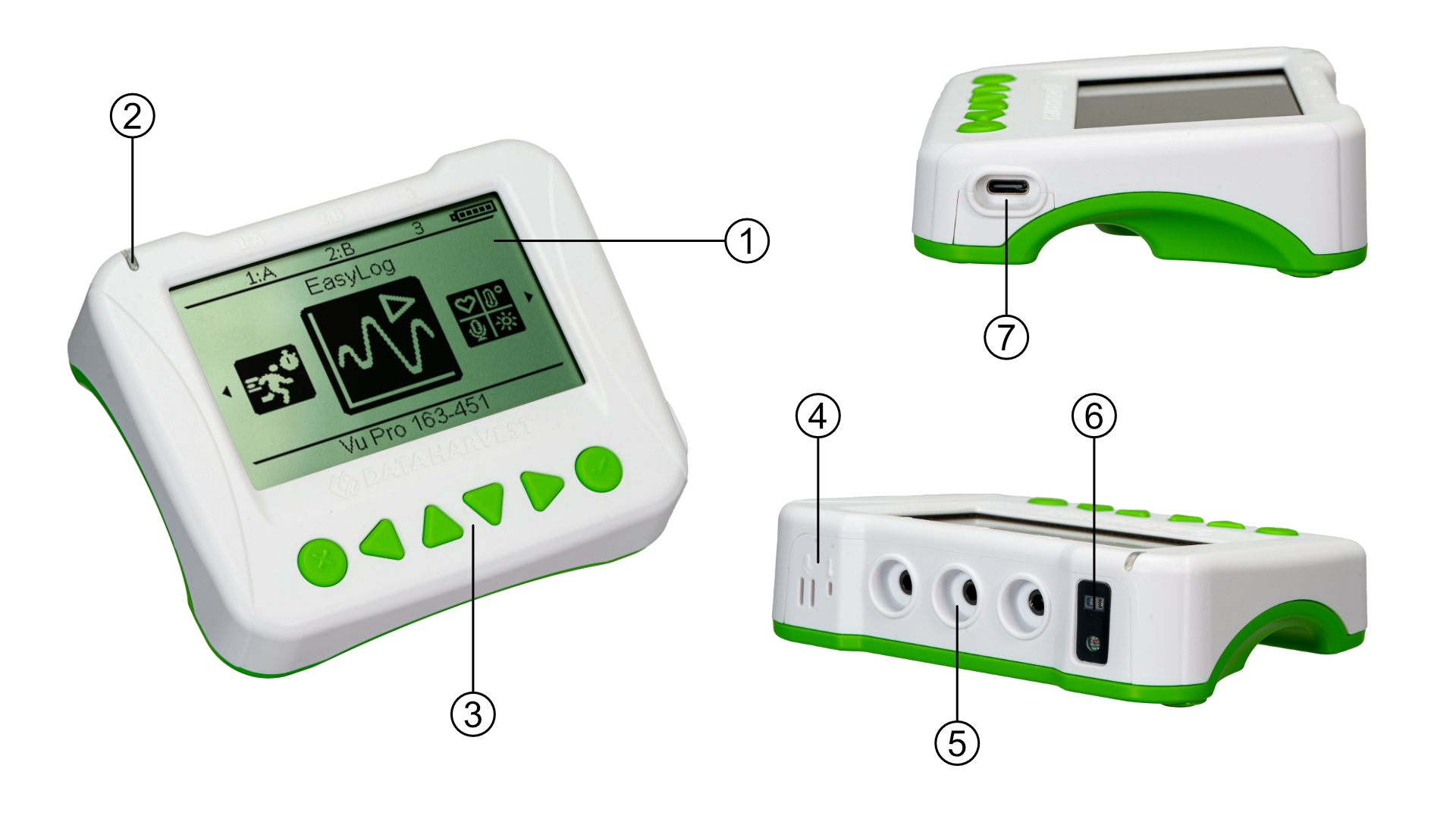
The LCD Front Screen (1)
The large format Vu Pro front screen provides access to (through the buttons) all of the functionality detailed in the Usage Information section of this manual.
The Status Indicators (2)
The Vu Pro features a single status indicator that changes colour and flashes. See the table below for further information.
|
Status Light |
Indicates |
|
|
No light |
|
Off |
|
Blue flashing |
|
On and Bluetooth advertising |
|
White flashing |
|
Charging via USB mains charger or USB port, Vu Pro is On and Bluetooth advertising |
|
Red, Green, Blue Flashing |
|
Charging via USB mains charger or USB port, Vu Pro is Off |
|
Green flashing |
|
Communication with the EasySense app (via USB or Bluetooth) has been established |
|
Solid Green |
|
Fully charged |
|
Orange flashing |
|
Recording data, a fast pulse indicates awaiting trigger in Remote Mode |
|
Red flashing |
|
Battery is low |










The Front Panel Buttons (3)
The front panel has a number of navigation and control buttons that are used to access all of the Vu Pro functionality. They are as follows:
◀ left or ► right scroll buttons to provide selection from a menu
Use the ▲ (up) or ▼ (down) scroll buttons to move the selection within a menu
Press the ✓ enter button to select the highlighted option
Press the X or ✓ to exit a menu
The Internal Sound And Temperature Sensors (4)
The Sound and temperature sensors are to be found here. With three additional ports available (5), a multi temperature-based experiment can be conducted.
Three External Sensors Input Ports (5)
Vu pro supports a number of external sensors to compliment the internal sensors. These are detailed in the Pack Contents section. They greatly extend Vu Pro's capabilities and can be used as a platform for more advanced studies.
Light And Heart Rate Sensors (6)
Extending the extensive capabilities of Vu and Vu+, Vu Pro has a dedicated built in heart rate sensor. Additional sensors can be added if there should be the need for a more comparative set of studies on the same instrument.
USB Port (7)
The USB port is used to provide a hardware connection to a collection station, and to provide the means by which Vu Pro can be charged.
Vu Pro And EasySense Software
Direct Data Logging
Vu Pro is designed to work directly with EasySense (as an installed application or PWA). A full compliment of experiments can be run by using Vu pro through BluetoothTM or USB. EasySense will support direct logging and data storage when connected as above.
Remote Data Logging
The ability to capture data independently (free of a capture station) is done through EasySense’s Remote Mode. This facility may be found in EasySense, under Setup. Once the conditions for data collection have been established, Vu Pro can be set to initiate collection for example, using a rapid press of the power button. Initiation of the experimental data collection by the software is followed by remote detachment; collection is then on Vu Pro. Data gathering is realised by using Setup once again. Details are given in the latest EasySense User Guide.