
Operational Overview
Below shows the specific parts of V-Log Pro. Read further to explore the functionality of each part!
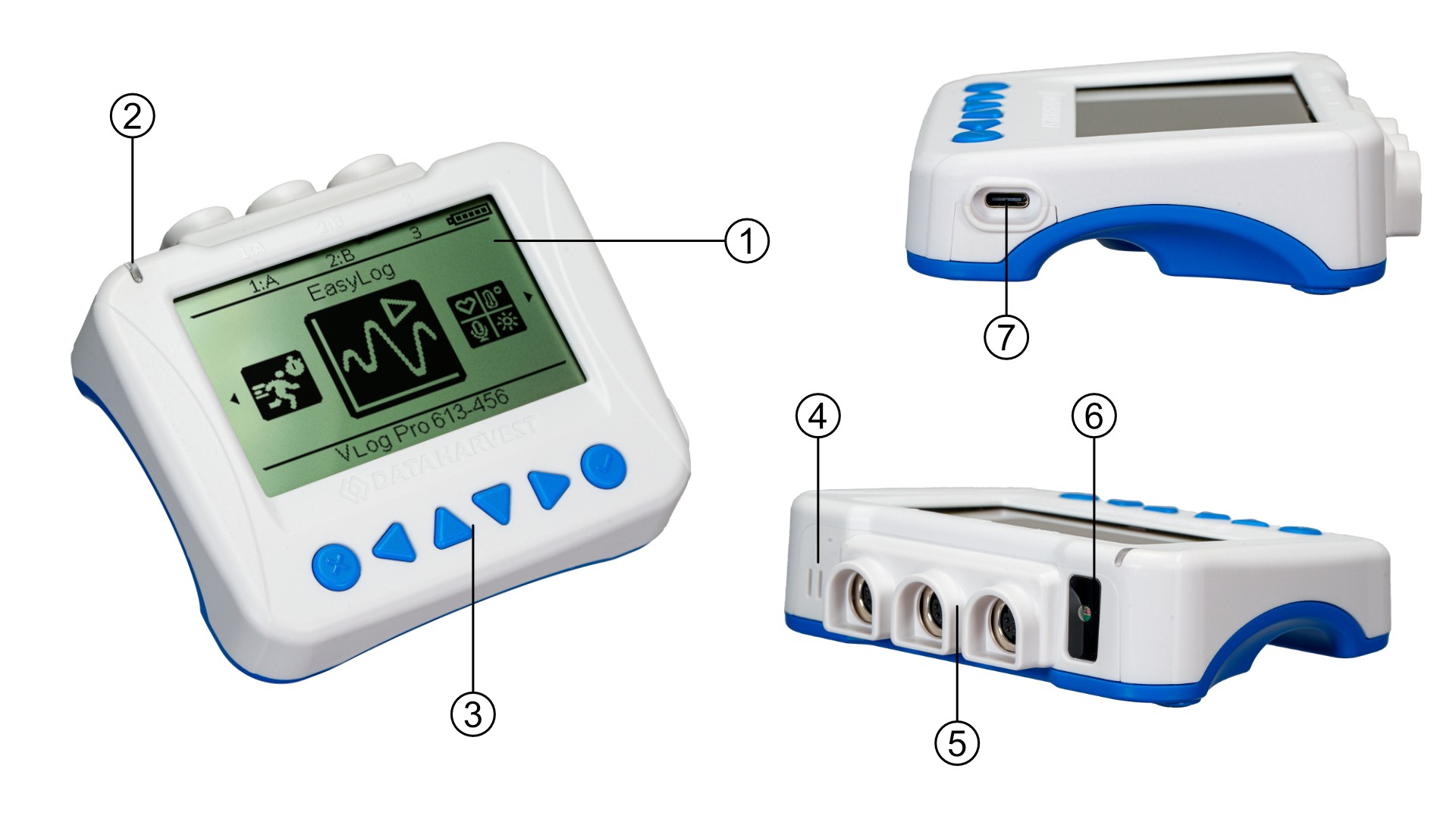
The LCD Front Screen (1)
The large format V-Log Pro front screen provides access to (through the buttons) all of the functionality detailed in the Usage Information section of this manual.
The Status Indicators (2)
The V-Log Pro features a single status indicator that changes colour and flashes. See the table below for further information.
|
Status Light |
Indicates |
|
|
No light |
|
Off |
|
Blue flashing |
|
On and Bluetooth advertising |
|
White flashing |
|
Charging via USB mains charger or USB port, V-Log Pro is On and Bluetooth advertising |
|
Red, Green, Blue Flashing |
|
Charging via USB mains charger or USB port, V-Log Pro is Off |
|
Green flashing |
|
Communication with the EasySense app (via USB or Bluetooth) has been established |
|
Solid Green |
|
Fully charged |
|
Orange flashing |
|
Recording data, a fast pulse indicates awaiting trigger in Remote Mode |
|
Red flashing |
|
Battery is low |










The Front Panel Buttons (3)
The front panel has a number of navigation and control buttons that are used to access all of the V-Log Pro functionality. They are as follows:
◀ left or ► right scroll buttons to provide selection from a menu
Use the ▲ (up) or ▼ (down) scroll buttons to move the selection within a menu
Press the ✓ enter button to select the highlighted option
Press the X or ✓ to exit a menu
The Internal Sound Pressure And Humidity Sensors (4)
The sound and pressure and humidity sensors are found here. With three additional ports available (5), a multi temperature-based experiment can be conducted.
Three External Sensors Input Ports (5)
V-Log pro supports a number of external sensors to complement the internal sensors. These are detailed in the Pack Contents section. They greatly extend V-Log Pro's capabilities and can be used as a platform for more advanced studies.
Light Sensor (6)
The internal Light Sensor is located here.
USB Port (7)
The USB port is used to provide a hardware connection to a collection station, and to provide the means by which V-Log Pro can be charged.
V-Log Pro And EasySense Software
Direct Data Logging
V-Log Pro is designed to work directly with EasySense (as an installed application or PWA). A full complement of experiments can be run by using V-Log Pro through BluetoothTM or USB. EasySense will support direct logging and data storage when connected as above.
Remote Data Logging
V-Log Pro can be used in EasyLog mode to accomplish automated remote logging.
The ability to capture data independently (free of a capture station) is done also through EasySense’s Remote Mode. This facility may be found in EasySense, under Setup. Once the conditions for data collection have been established, V-Log Pro can be set to initiate collection for example, using a rapid press of the power button. Initiation of the experimental data collection by the software is followed by remote detachment; collection is then on V-Log Pro. Data gathering is realised by using Setup once again. Details are given in the latest EasySense User Guide.