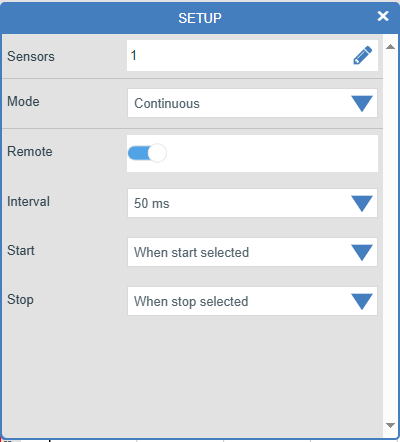
4.2.1.0 Continuous
Mode
Select the Mode choice symbol and choose your mode of logging.

Record sensor values continuously as a line graph until the stop condition is reached. Choose whether the data-logging is to be remotely-driven: please see later notes.
Remote See notes below in Section 4.2.1.1.
The Interval Select the interval between samples being taken.
The Start Conditions
Select the condition required for the recording to start. The choice of start conditions and triggers available depend upon your experimental requirements. Begin the recording request as soon as you click on the Start icon.
When Start selected
Executes an immediate start with no other conditions.
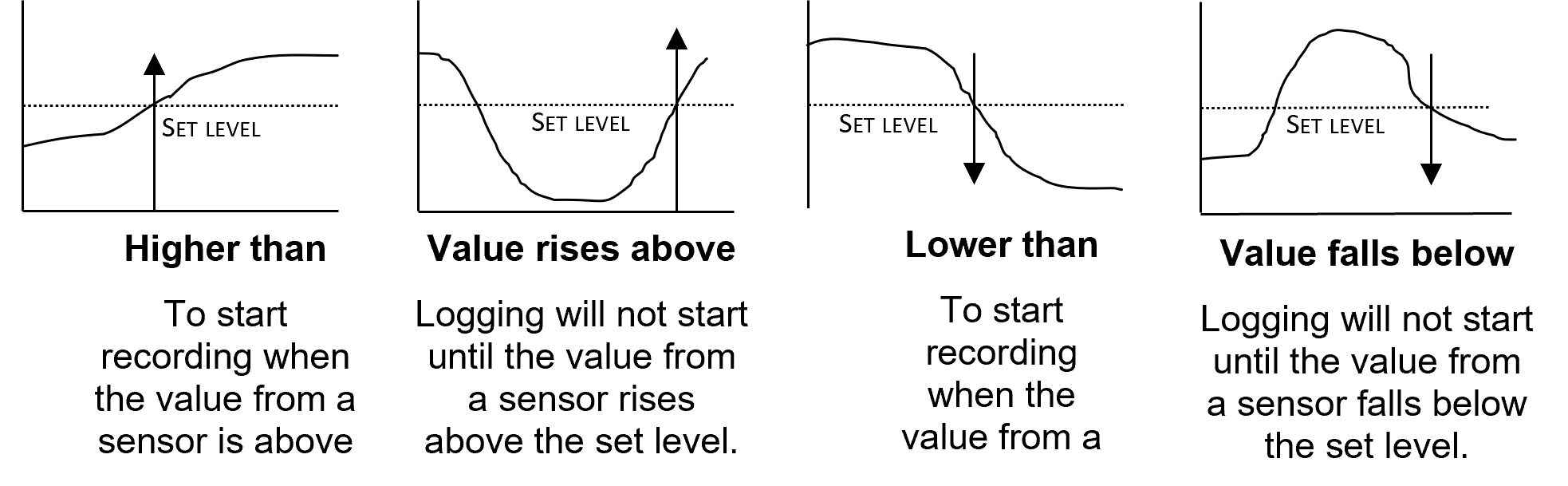
A “trigger on sensor level” is available for the Start conditions:
Higher than: starts recording when the value from a sensor is above the set level.
Value Rises Above: allows logging when the value rises above the set level.
Lower than: starts recording when the value from a sensor is below the set level.
Value Falls Below: enforces logging that will not start until the value from a sensor falls below that set level.
The Stop Conditions
These can be tailored for experimental demands:
When Stop selected enforces the user to select Stop on the main screen.
After duration - Allows the user to set a fixed time to terminate collection. This is useful if an automated stop is needed.
After number of samples - This will create a termination of recording after a defined number of data points (when the time and frequency of measurement are combined to set the desired data size).