
4.2.1.1 Remote Mode
Data Harvest’s data loggers have had a long-standing capability to record data independently using a data logger (EasyLog). This is now possible utilizing EasySense2 with Smart Wireless Sensors. An outline of how to use them in this manner is now shown.
In its simplest form, the powered sensor may run in Remote Mode, by pressing the power button in rapid succession three times. Collection is terminated by three more such button presses. Data collection (retrieval) is realised from section B below. The collection will be defined by the default parameters for the sensor.
An alternative method is now detailed.
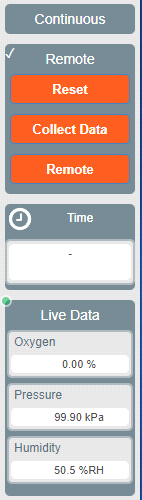
Once the sensor has been configured (Devices), Setup (Continuous ) provides a “remote slider” which, when engaged, gives access to the remote functionality (see opposite). The “Remote” is then used to allow independent logging by detachment from EasySense2. Further starting options (Start) become available in the Setup panel:
At Time - This will execute collection at a defined time.
Device Button - Initiates collection by pressing the power button.
The general sequence of events would be:
A: Devices > Setup > Continuous > Remote slider engaged
Arrange the Interval, Start and Stop conditions.
Start the experiment (Start) > Remote (the sensor now works independently).
B: Reconnect the sensor with Devices > Connect
Setup > Remote slider engaged > Collect Data (retrieval) > Stop as required.
Remote Mode is not designed to gather data in the same way Continuous would when connected to an EasySense platform. We recommend “trialling” the experiment using a very short interval – and then ascertain how many data points the sensor will gather given the demands upon it. Re-application of the same conditions, but with a longer interval (to cover your experiment) can then be run as desired.